
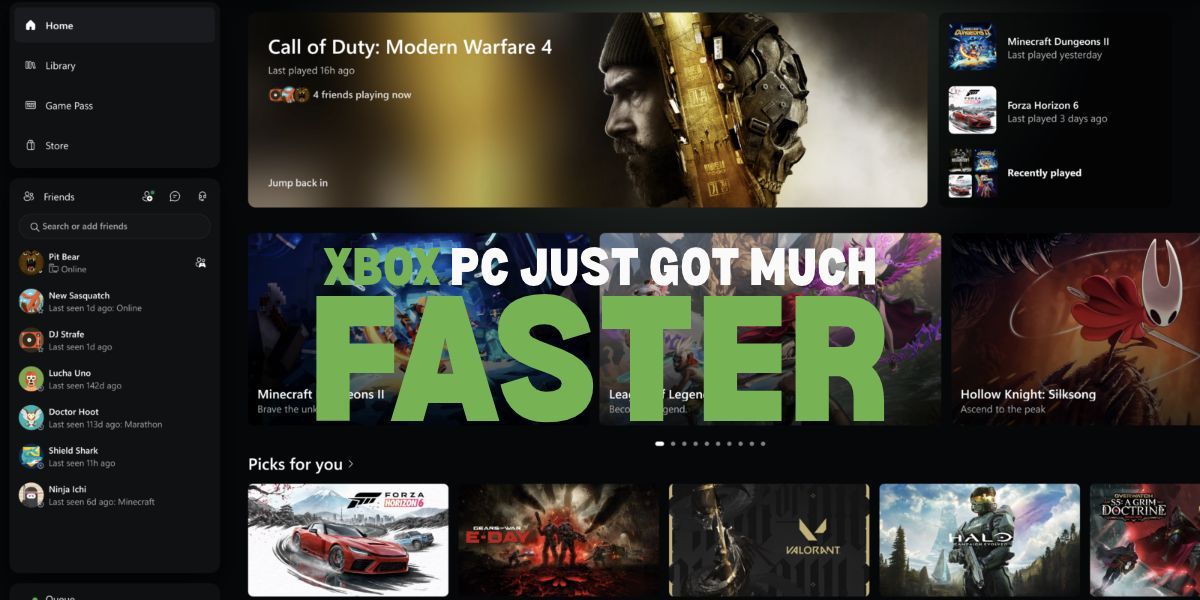
If you have ever clicked open a gaming app, stared at a loading wheel, and wondered why your high-powered setup feels like dial-up internet, you are not alone. Xbox heard the complaints, took notes, and decided it was finally time to tidy up the house.
A major overhaul is rolling out across PC, web, and cloud setups, and the focus is simple: less waiting around and fewer confusing menus.
A Speedy Boost for the PC App
The major change lands squarely on the Xbox PC app. Members of the Xbox Insider program are getting the first look on a major speed boost.
According to Xbox testing, the app now launches up to 60 percent faster. Even better, store pages, the home feed, and Game Pass menus load roughly 50 percent quicker, while pop-up windows inside the app open up to 65 percent faster. In plain English: you click, it opens, and you play.
Speed is nice, but navigation needed love too. Xbox redesigned the game library so it is actually easy to browse your collection without feeling like you are digging through an old cupboard. Your friends list has also moved straight to the main navigation menu. That means seeing who is online, joining a party, or sending a quick message takes only a click or two.
Even searching got an upgrade: one search bar now tracks down installed games, store add-ons, and people all at once.
Cloud and Web Gaming Get a Makeover
It is not just desktop players getting the good stuff. If you stream games through a browser at play.xbox.com, Microsoft is rolling out a clean new web layout to the wider public over the coming weeks.
The updated web portal introduces a dedicated Library tab. This pulls together every title you can stream, whether you bought it outright or play it via Xbox Game Pass. You can sort your titles by genre, recent play history, or input type (like controller or touchscreen).
For people gaming on monitors or laptops, a new Desktop Mode uses widescreen space much better so you are not left scrolling endlessly. There are also dark and light themes, plus five new high-contrast options to make everything easier on the eyes.
Bringing One Familiar Look to Every Screen
The refresh is not stopping at web browsers, either. Xbox confirmed the updated interface is rolling out to cloud gaming apps on supported smart TVs and VR headsets.
The goal is pretty obvious: whether you sit at a desk, lounge on a sofa with an app on your TV, or strap on a headset, the menus should feel familiar. You should never have to re-learn how to launch a game just because you changed rooms.
If you are an Xbox Insider, you can test these PC updates right now. For everyone else, expect these quality-of-life updates to land on your screen soon.